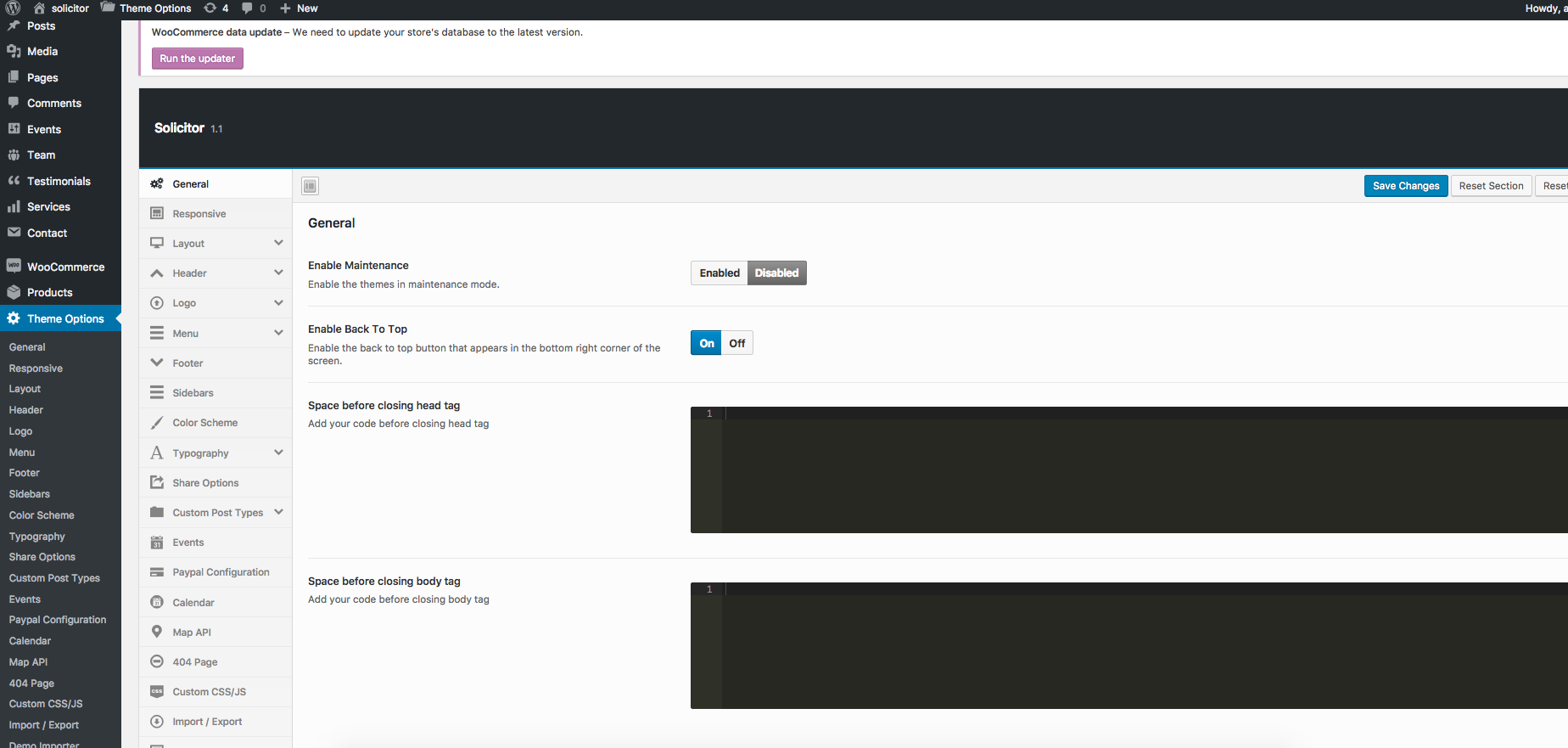
Solicitor theme comes with an extensive Theme Options Panel. From the Theme options panel you will be able to set or change the color of the theme, layout, header style, social icons and a lot more. You should take the time to go through all of these options to ensure that you are getting the most out of the theme.
General
Setting
Description
Enable Maintenance
Put the site into maintenance mode. Visitors see a maintenance notice instead of the front end. Default: Disabled.
Enable Back To Top
Show or hide the floating “Back to Top” button in the bottom-right corner. Default: Enabled.
Space before closing head tag
Paste custom code (meta tags, scripts) to output before the </head> tag.
Space before closing body tag
Paste custom code (analytics, scripts) to output before the </body> tag.
Responsive
Setting
Description
Enable Responsive
Toggle the responsive (mobile-friendly) layout on or off. Default: Enabled.
Enable Zoom on mobile devices
Allow pinch-to-zoom on touch devices. Default: Disabled.
Layout
Setting
Description
Page Layout
Wide (full-width container) or Boxed (centred with visible body background). Default: Wide.
Repeatable Background Images
When Boxed: choose from built-in tile patterns for the body background.
Upload Repeatable Background Image
Upload your own tile image for the Boxed body background.
Upload Full Screen Background Image
Upload a full-screen non-tiling image for the Boxed body area.
Site Width
Site container width in pixels (no “px”). Default: 1170.
Layout – Content
Setting
Description
Content area Background
Background color or image for the main content area.
Top and Bottom padding for content area
Padding for the content wrapper. Default: 60px top/bottom.
Minimum Height for Content area
Minimum content area height in pixels (no “px”). Default: 400.
100% Content Width
Set content to 100% browser width. Wide layout only.
Header
Setting
Description
Header Layout
Select the header layout style. Default: Style 1.
100% Header Width
Set the header to 100% browser width. Wide layout only.
Header Background
Background color or image for the header.
Header – Info Blocks
Setting
Description
Show/Hide
Toggle the three header info blocks on or off. Default: Enabled.
Header Info 1/2/3 Icon
FontAwesome class for each block icon (e.g. fa fa-map-marker). See fontawesome.io/icons.
Header Info 1/2/3 Text
HTML text for each block. Supports <strong>, <br>, etc.
Header Info Icon Typography
Font size and style for info block icons.
Header Info Typography
Font size and style for info block text content.
Header – Topbar
Setting
Description
Enable Topbar
Show or hide the thin topbar strip above the header. Default: Disabled.
Topbar Background
Background color for the topbar.
Topbar message
Short text displayed in the topbar (e.g. announcement, phone number).
Topbar message URL
Link URL for the topbar message text.
Topbar message Typography
Font settings for the topbar text.
Social Links
Social icons shown in the topbar. Drag to reorder.
Social Icons size
Font size for topbar social icons.
Social Icons Link Color
Color, hover, and active states for topbar social icons.
Header – Inner Page Header
Setting
Description
Show/Hide page header
Show or hide the banner area on all inner pages/posts. Default: Enabled.
Default Page Header Color
Background color for the inner page header area.
Default Banner Image
Default banner image for all inner pages without their own image.
Default Banner for Events
Default banner image for event pages.
Default Banner for Blog Posts
Default banner image for blog post pages.
Default Banner for Services
Default banner image for service post pages.
Default Banner for Team
Default banner image for team member pages.
Default Banner for WooCommerce Products
Default banner image for WooCommerce product pages.
Default Height
Default height for the inner page header in pixels (no “px”).
Show page title
Show or hide the page/post title inside the banner. Default: Enabled.
Title Typography
Font, size, weight, and color for the banner title text.
Page header elements color
Color for elements (breadcrumbs, etc.) inside the page header.
Enter the 1× logo width in pixels (not the retina width). Default: 164.
Standard Logo Height for Retina Logo
Enter the 1× logo height in pixels. Default: 45.
Logo – Admin Logo
Setting
Description
Custom admin login logo
Upload a 254×95px image to replace the WordPress login page logo.
Menu
Setting
Description
Direction arrows with menu label
Show dropdown indicator arrows next to menu items with sub-menus. Default: Enabled.
Main Navigation Links Typography
Font, size, weight, and line-height for main nav links.
Main Navigation Link Color
Text color, hover, and active states for main nav links.
Background color for dropdown menus
Background for dropdown sub-menu panels.
Dropdown links border bottom
Bottom border for each dropdown link.
Dropdown links spacing
Padding for dropdown links.
Background color for dropdown hover
Background when hovering a dropdown link.
Dropdown Menu Links Typography
Font settings for dropdown link text.
Dropdown links color
Color states for dropdown links.
Megamenu Background color
Background for megamenu panels.
Megamenu Column Title Typography
Font for megamenu column headings.
Megamenu Content Typography
Font for megamenu body content.
Menu – Mobile Menu
Setting
Description
Mobile Menu opener typography
Font settings for the mobile menu toggle button.
Mobile Menu opener background
Background color for the mobile menu toggle button.
Mobile Menu opener color
Text/icon color for the mobile menu toggle button.
Mobile Menu space from top
Distance from top of page where mobile menu appears (no “px”).
Background color for mobile menu
Background for the mobile navigation panel.
Mobile Menu links color
Text color for mobile menu links.
Mobile Menu links border bottom
Bottom border for each mobile menu link.
Width/Height of sub menu opener
Dimensions of the button expanding first-level sub-menus. Default: 75×49px.
Background for sub menu opener
Background for the first-level sub-menu opener.
Sub menu opener icon size
Font size of the expand icon. Default: 16px.
Sub menu opener icon color
Normal and hover colors for the expand icon.
Width/Height of sub-sub menu opener
Dimensions for second-level sub-menu opener. Default: 51×42px.
Background for sub-sub menu opener
Background for the second-level sub-menu opener.
Sub-sub menu opener icon size
Font size of second-level expand icon. Default: 16px.
Sub-sub menu opener icon color
Normal and hover colors for second-level expand icon.
Footer
Setting
Description
100% Footer Width
Set footer to 100% browser width. Wide layout only.
Footer Background
Background color or image for the footer.
Footer Top/Bottom padding
Padding for the footer area.
Footer border top
Top border line for the footer.
Footer Layout
Number of widget columns: 1, 2, 3, 4 (default), or 5.
Footer widgets title typography
Font settings for footer widget titles.
Footer widgets area text typography
Font settings for footer widget body text.
Footer widgets area links color
Link color states in footer widgets.
Enable Footer copyrights area
Show or hide the copyright bar. Default: Enabled.
Footer Copyright Text
Text shown in the copyright bar. Default: “All Rights Reserved”.
Social Links
Social icons in the footer. Drag to reorder.
Upload Footer Logo
Upload a separate logo to display in the footer.
Sidebars
Setting
Description
Sidebar position
Global sidebar position: Left, Right, or None. Default: Right.
Default single post Sidebar
Sidebar for single blog posts. Default: post-sidebar.
Default Page Sidebar
Sidebar for standard pages.
Post Archive Sidebar
Sidebar for blog archive pages.
Search Page Sidebar
Sidebar for search results. Default: post-sidebar.
Default services post Sidebar
Sidebar for single service pages.
Default events post Sidebar
Sidebar for single event pages.
Default team post Sidebar
Sidebar for single team member pages. Default: page-sidebar.
Shop Archive Sidebar
Sidebar for WooCommerce shop archive. Default: page-sidebar.
Color Scheme
Setting
Description
Color Scheme
Pre-Defined (12 presets) or Custom Color. Default: Pre-Defined.
Predefined Color Schemes
Choose from color1.css through color12.css. Default: color1.css.
Custom Theme Color
Pick a custom primary accent color (when Custom Color is selected).
Typography
Setting
Description
Heading font
Google Font for all headings. Default: Playfair Display.
Body/Primary font
Google Font for body text. Default: Roboto (weight 400).
More Typography Options
Setting
Description
Body
Override body text typography independently.
H1–H6 Titles
Individual font, size, weight, line-height, and color for each heading level.
Additional Styles
Setting
Description
Additional Font 1–6
Load up to 6 extra Google Font families for use in custom CSS or shortcodes. Default: Font 1 = Roboto Bold.
ℹ️ Additional font slots only load the font — they do not apply it automatically. Reference the loaded font family in your Custom CSS to use it on specific elements.
Share Options
Setting
Description
Social Sharing
Master switch for social sharing buttons. Default: Enabled.
Choose which post types (Posts, Pages, Services, Events, Team) show share buttons.
Tooltip text (per network)
Custom hover tooltip text for each share icon.
Show sharing icon before icons
Show a leading icon before the share buttons. Default: Disabled.
Share icons box size
Dimensions of each share button. Default: 30×30px.
Share icons font size
Icon font size. Default: 16px.
Custom Post Types
Configure permalink slugs, dashboard labels, and archive settings for Solicitor’s custom post types. After changing slugs, go to Settings → Permalinks and click Save to apply.
Setting
Description
Events slug / menu name / categories title
Customise URL slug, WP Dashboard label, and category label for Events.
Disable Event archive page
Prevent WordPress auto-creating an events archive page. Default: Disabled.
Services slug / menu name / categories title
Customise URL slug, WP Dashboard label, and category label for Services.
Disable Service archive page
Prevent auto-creating a services archive page. Default: Disabled.
Team slug / menu name / categories title
Customise URL slug, WP Dashboard label, and category label for Team.
Disable Team archive page
Prevent auto-creating a team archive page. Default: Disabled.
Testimonials slug / menu name / categories title
Customise URL slug, WP Dashboard label, and category label for Testimonials.
Disable Testimonial archive page
Prevent auto-creating a testimonials archive page. Default: Disabled.
Events
Setting
Description
Events Display Time
Whether events stay visible until their Start Time or End Time. Default: End Time.
Events date and time
Whether to show full date/time meta on event listings. Default: Enabled.
Text before event time
Separator text shown just before the time on event listings. Default: ” – “.
Separator for multiple date events
Separator between multiple dates on event listings. Default: ” – “.
Paypal Configuration
Setting
Description
Paypal Email Address
PayPal Business email where event ticket payments are sent.
Paypal Token
PayPal identity token for IPN (Instant Payment Notification) verification.
Paypal Site
Sandbox (test) or Live (production). Default: Live.
Payment Currency
Payment currency (USD, EUR, GBP, and more). Default: USD.
Calendar
Setting
Description
Calendar Header View
Layout style for the calendar header navigation area.
Limit of Events
Maximum events shown per day block in month view. Default: 4.
Default Calendar View
Default view when calendar loads: Month, Week, or Day. Default: Month.
Heading Today/Month/Week/Day
Translate calendar navigation button labels into local language.
Calendar Month Name / Short
Full and abbreviated month names in local language (comma-separated).
Calendar Day Name / Short
Full and abbreviated day names in local language (comma-separated).
Show WP Events
Include WordPress Events in the calendar. Default: Enabled.
Google Calendar API Key
API key for Google Calendar feed integration.
Google Calendar ID
Google Calendar ID to display in the event calendar.
Event Color
Default colour for event markers in the calendar.
Recurring Event Color
Colour for recurring event markers.
Map API
Setting
Description
Google Maps API Key
Enter your Google Maps API key. Required for all maps in the theme (event maps, location banners).
404 Page
Setting
Description
Page header image
Upload a banner image for the 404 error page header.
Page header height
Height of the 404 page header. Default: 200px.
Page title
Custom title for the 404 page. Default: “404 Error”.
Page title color
Color for the 404 page title.
Page content
HTML/text content shown in the body of the 404 page.
Custom CSS/JS
Setting
Description
CSS Code
Custom CSS injected site-wide using the Ace editor (Monokai theme).
JS Code
Custom JavaScript injected at the bottom of each page using the Ace editor.
Import/Export
Setting
Description
Export
Copy all Theme Options as a portable data string for backup or migration.
Import
Paste exported data to restore all Theme Options. Overwrites current settings.
Reset to Defaults
Reset all settings to factory defaults. Always export a backup first.
How can we help?
Subscribe to website maintenance plans exclusively offered to our themes & plugins users and enjoy flat 50% off for lifetime.Subscribe Now & Save 50%