The Sermon Details Page (also called the single sermon page) is the individual page that opens when a visitor clicks on a sermon. It displays all the content and media associated with that sermon.
Default Layout
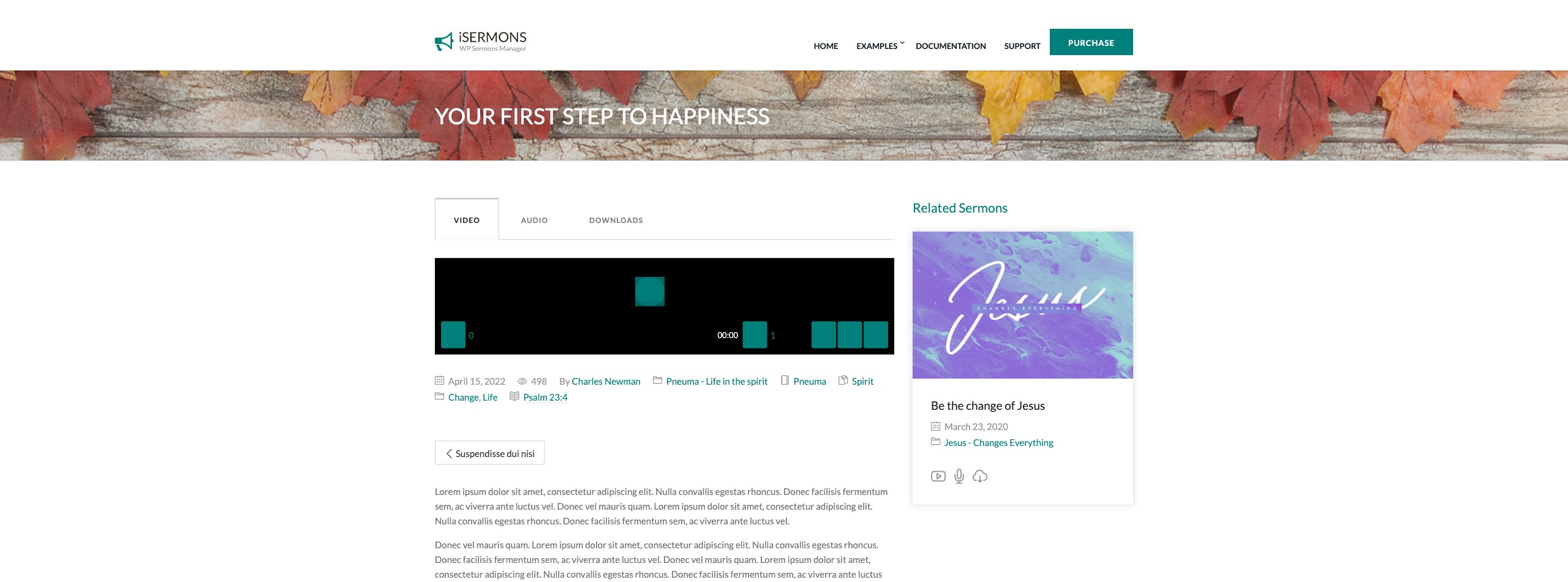
When using the default iSermons template, the sermon detail page automatically renders the following elements (depending on what is enabled in Settings → Details Page):
- Sermon title and featured image
- Audio player — displayed when an audio file is attached
- Video player — displayed when a video URL is attached
- Download buttons — for Audio, Bulletin, and Sermon Notes (if files are attached)
- Sermon metadata — Categories, Series, Books, Topics, Preachers, Bible Passage, Date, and View count (each toggleable individually)
- Star rating widget — allows visitors to rate the sermon
- Sermon content — the full text or transcript entered in the WordPress editor
- Next / Previous navigation — links to adjacent sermons
- Related Sermons — a sermon list block showing sermons with shared taxonomy terms
- Related Terms — a taxonomy term block (e.g. other series)
Configuring What Appears
All elements on the detail page are controlled from iSermons → Settings → Details Page. You can enable or disable each component individually:
| Setting | What it Controls |
|---|---|
| Sermon Meta Data | Checkboxes for each metadata field (Categories, Series, Books, Topics, Preachers, Date, Views, etc.) |
| Star Rating | Show or hide the star rating widget on the detail page |
| Next / Previous Links | Show or hide navigation to adjacent sermons |
| Related Sermons | Enable and configure a related sermons block using an [isermons-list] shortcode |
| Related Terms | Enable and configure a related terms block using an [isermons-terms] shortcode |
Custom Detail Page Layout
If you prefer to design the sermon detail page yourself using Elementor or another page builder, you can use the iSermons Elementor widgets to build a fully custom layout, overriding the default template.
Tip: To display the sermon view count in metadata, make sure Settings → General → Sermon Views Tracking is also enabled — otherwise no view data is collected to show.
[Screenshot: A sermon detail page showing the audio player, download buttons, metadata row, star rating, sermon content, and related sermons section at the bottom]