In order to start selling your event tickets, you must activate enter your PayPal account information plugin. The only payment option currently offered by this plugin is ‘PayPal Standard’, which needs some settings to be added before you can start the event ticket selling.
Payment settings for the PayPal can be done from your WP Dashboard => Theme Options => Paypal Configuration
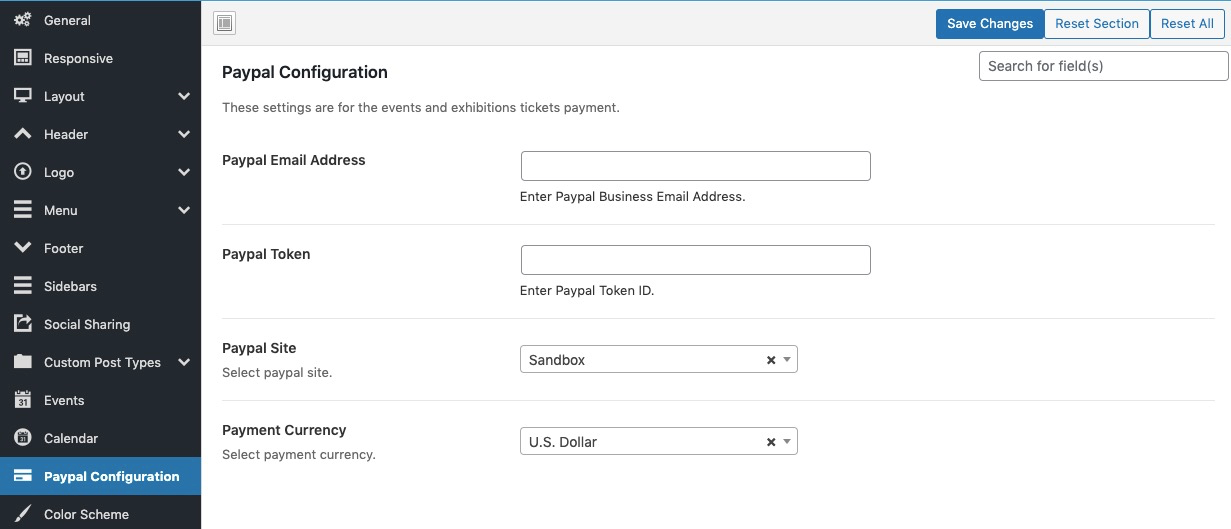
- Enter your PayPal email(Make sure your PayPal account is eligible to receive payments)
- Enter PayPal Token ID (See doc here)
- Choose ‘Live’ when you are ready to receive payments. For testing use ‘Sandbox’. Make sure you enter your sandbox email, personal token when using ‘Sandbox’ here.
- Choose your currency(Only currencies supported by PayPal are listed here)