There are several options available for you to change some aspects of the inbuilt Event Manager of the theme. All these options can be accessed from your WP Dashboard => Native Church => Theme Options => Event Options
Disable inbuilt event manager
Some users like to use a third party event management plugin in place of the theme’s inbuilt events functionality. There is no restriction whatsoever for this circumstance but sometimes both the event manager(inbuilt & third party plugin) can cause some conflicts when active together. To over come this problem we have included an option to disable the inbuilt event functionality.

Recurring Info
When an event is recurring then it will show an icon[] next to title of the event. This icon will show recurring information when hovered over. You can disable this using below option

Google Events
When you sync your Google Calendar events into your website using the calendar options. Those events will also be displayed in the list, grid and other views of the events. A Google icon will display just next to the event title when this option is enabled.

Events Display On Website
By default events are meant to display in the upcoming events list until the start time of the event but for some users it is required to display them until the end of the event. If it is set to ‘End Time’ then the events will remain in the upcoming events list till the end time along with the countdown timer will count till the end time.

Event Time Picker
The time picker(while creating/editing events) use 24 hours time format which can be changed to 12 hours format as used by people in most of the countries.

Event Time Display
You can select which time you would like to show for the events on the website frontend, select from available options

Event Date Display
You can select which date you would like to show for the events on the website frontend, select from available options

Additional Options
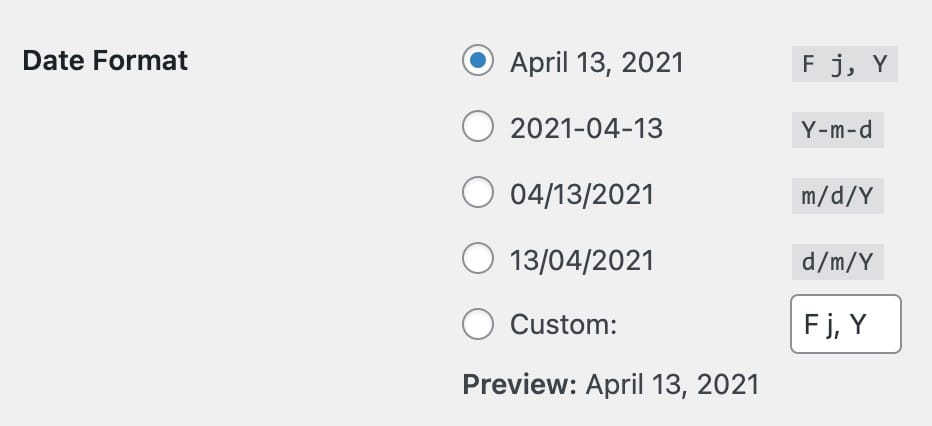
Change date format
This theme utilises WP’s own date format settings for the date display of the events. These settings can be changed from your WP Dashboard => Settings => General
Change permalinks and label of the event post type
The custom post type created for the events is registered with ‘event’ as slug for the permalinks. This means that the URLs for the event posts will be like https://www.yourdomain.com/event/your-event-name But some users may want to change this permalink structure along with the naming ‘Event’ in the WP Dashboard to something else. We already added the easy options for this kind of requirement. All the options related to permalinks structure and naming of the event post type can be accessed from your WP Dashboard => Native Church => Theme Options => Custom Post Types => Event
