[ipray_list]
Displays the public prayer wall showing all published prayer requests.
What This Shortcode Does
- Displays published prayers
- Shows prayer content, name/anonymous label, date
- Includes “I prayed for this” interaction
- Supports comments (if enabled)
- Supports pagination
- Supports list or grid layout
This is the primary shortcode used to create a Prayer Wall page.
How to Use
Add the shortcode to any page:
[ipray_list]
Customizing the Output
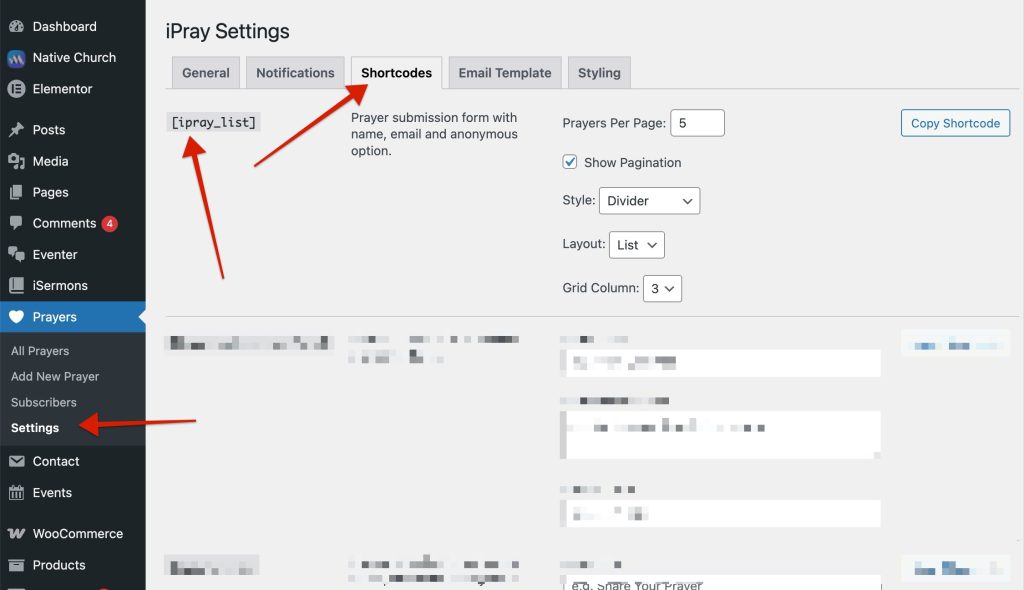
Instead of manually editing shortcode attributes, it is recommended to use:
Prayers → Settings → Shortcodes → Prayer List
From there, you can configure:
- Number of prayers per page
- Pagination on/off
- Layout style
- Column count (grid mode)
- Visual style options
Then copy the generated shortcode and paste it into your page.
When to Use
- Creating a public prayer wall
- Displaying prayers on a dedicated page
- Showing community prayer activity