Below are the styling sections available in iPray and what each one controls.
General Typography
Controls text appearance used throughout iPray.
Typical options include:
- Font family (Google Fonts, if API key is provided)
- Font size
- Font weight
- Line height
- Text transformation
This section affects headings and body text used across prayer lists, forms, and dashboards.
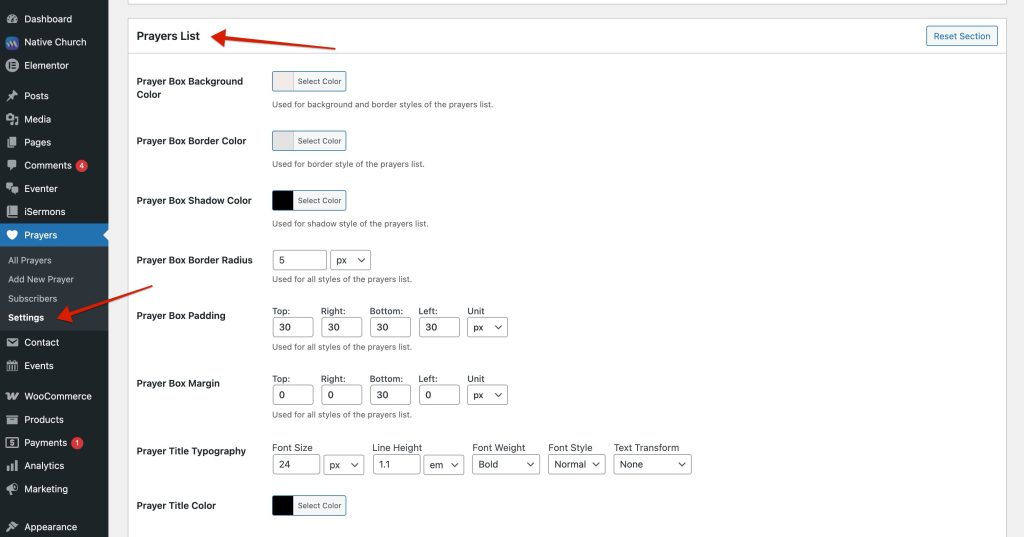
Prayers List
Controls how prayer items appear on the public prayer wall.
Common settings include:
- Prayer item background color
- Divider color
- Border color
- Shadow color
- Corner radius
- Spacing between prayer items
This section affects only the prayer list display, not forms or dashboards.
Prayer Form
Controls the appearance of the prayer submission form.
Settings typically affect:
- Form background
- Input field colors
- Label text color
- Form container spacing
Changes here apply only to the [ipray_form] output.
Subscription Form
Controls styling for the subscription form.
This section affects:
- Background and borders
- Text colors
- Button styling (form-specific)
Useful if the subscription form is placed on a separate page.
Buttons
Controls the appearance of buttons used across iPray.
This includes:
- Submit buttons
- “I prayed for this” button
- Dashboard action buttons
Typical controls include:
- Button background color
- Text color
- Hover color
- Border radius
Prayers Dashboard
Controls styling of the user dashboard.
This affects:
- Dashboard container
- Prayer list inside the dashboard
- Action buttons (like delete, if enabled)
Changes here do not affect the public prayer list.
Comments Modal
Controls the appearance of the comments interface.
Includes:
- Modal background color
- Header styling
- Text colors
- Button styling
This section is applied only when comments are enabled.
Form (Shared Form Styles)
This section applies shared styles used across multiple forms, such as:
- Input fields
- Textareas
- Labels
It helps maintain consistent form appearance across:
- Prayer form
- Subscription form
- Comment form