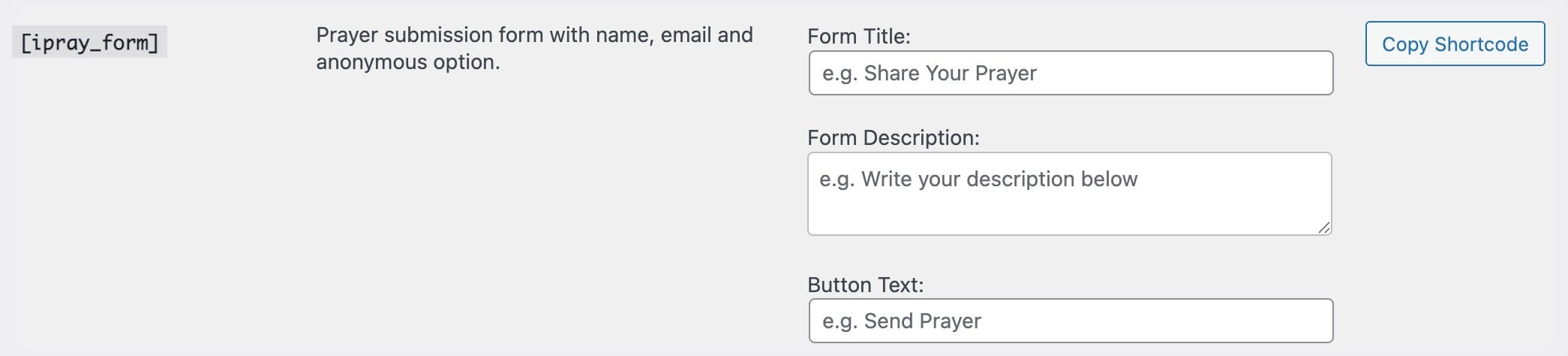
The iPray submission form allows your website visitors to submit prayer requests directly on the frontend. It works on any page where you add the shortcode:
[ipray_form]
The form loads instantly, submits without reloading the page, and displays helpful success or error messages.
Fields in the Prayer Form
The prayer form includes the following fields:
✔ Name
The person’s name.
If you enable anonymous submissions, the name becomes optional when “Submit anonymously” is selected.
Required for:
-
Sending confirmation emails
-
Prayer interaction notifications (if enabled)
-
Dashboard login via email link
✔ Phone Number (Optional)
Displayed on the submission form but optional.
✔ Prayer Request Message
The main prayer text. This is required.
Optional Frontend Features
Depending on your settings, the form may also display:
✔ Submit Anonymously
Shown only if enabled in:
Prayers → Settings → General → Allow anonymous submissions
If checked, the name will not appear publicly on the prayer wall.
✔ Notify Me When Someone Comments
Appears only if BOTH of these are enabled:
-
Allow comments on prayers
-
Notify submitter on new comments
This allows the submitter to receive email alerts for new comments.
Success & Error Messages
All form submissions use AJAX, so:
-
No page reloads
-
Success messages appear inline
-
Errors are shown instantly (email validation, required fields, etc.)
Moderation (Optional)
If you choose Pending Review for new prayers in:
Prayers → Settings → General → New prayer status
Then:
-
Prayers do not appear publicly until approved
-
Admin receives a notification (if enabled)
Customizing the Form Title & Text
Go to:
Prayers → Settings → Shortcodes
There you can customize:
-
Form Title
-
Description
-
Submit Button Label
These settings are applied automatically to the [ipray_form] shortcode output.